

Advanced Settings
To access the advanced settings menus on your Base Station, follow these steps:
Navigate to Settings Menu1
Begin by navigating to the settings menu on the user interface.
Access General Settings2
Press the top left corner where it says “General.”
View Advanced Options
3
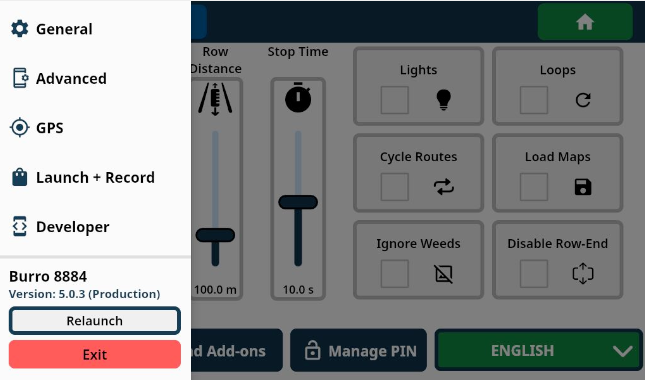
A side menu will appear displaying the following options:
Advanced: Opens the advanced settings menu.
GPS: Opens the localization modes menu, where you can adjust GPS settings and pair your Burro to a new base station.
Launch + Record: Access options for recording bag data, as directed by a Burro representative or for expert users.
Developer: Access experimental settings for advanced features as directed by a Burro representative or for expert users.
User Interface (UI) - Advanced Settings
The following advanced settings can be adjusted to optimize Burro's performance:
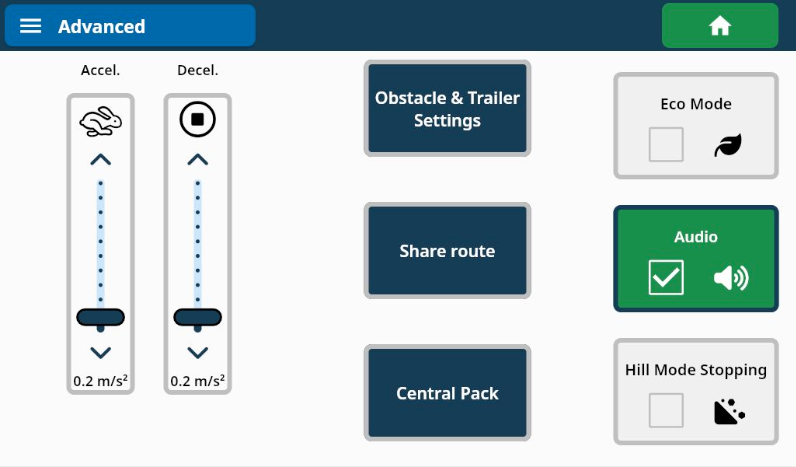
Accel. (Acceleration)
Use this setting to control how quickly Burro will start moving from a programmed stop or pause (e.g., station, route start point, destination, etc.).
This setting does not affect the slow down/stop behavior for obstacle handling.
Decel. (Deceleration)
Use this setting to control how quickly Burro will stop moving at a programmed stop or pause (e.g., station, route endpoint, destination, etc.).
This setting does not affect the slow down/stop behavior for obstacle handling.
Eco Mode
Eco Mode will pause segmentation (active traversable terrain and obstacle detection models) if Burro remains stationary or stuck on an obstacle for more than 30 seconds.
Once this time has expired, Burro will only resume autonomy with manual intervention.
This feature is useful for harvest assist applications, saving battery by reducing the amount of computer processing when Burro is left stationary on a route for an extended period.
Audio (On by Default)
This setting toggles Burro’s audio from the touch screen ON/OFF.
Grande Audio
Audio is significantly louder with Burro Grande, which comes with a pre-installed external speaker.
Hill Mode Stopping
Toggle this setting so that Burro Standard/Burro XL remains stationary on sloped surfaces after a programmed or manual stop (e.g., when the red stop button is pressed or the bumper bar is hit).
This setting has no effect on Burro Grande, which has physical brakes and cannot ‘free wheel’ or be placed in “neutral.