

Clear Core Reference
ClearCore I/O Motion Controller
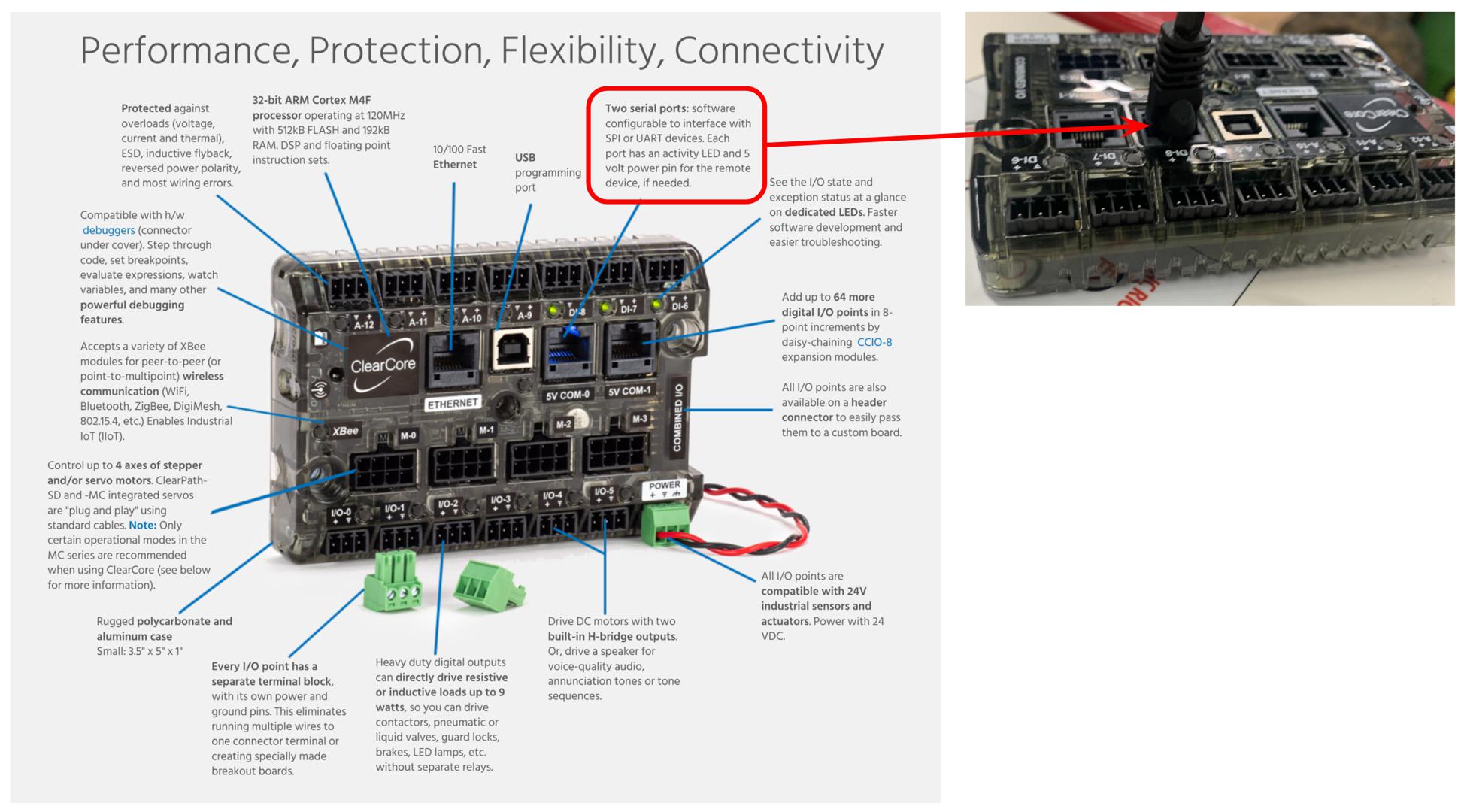
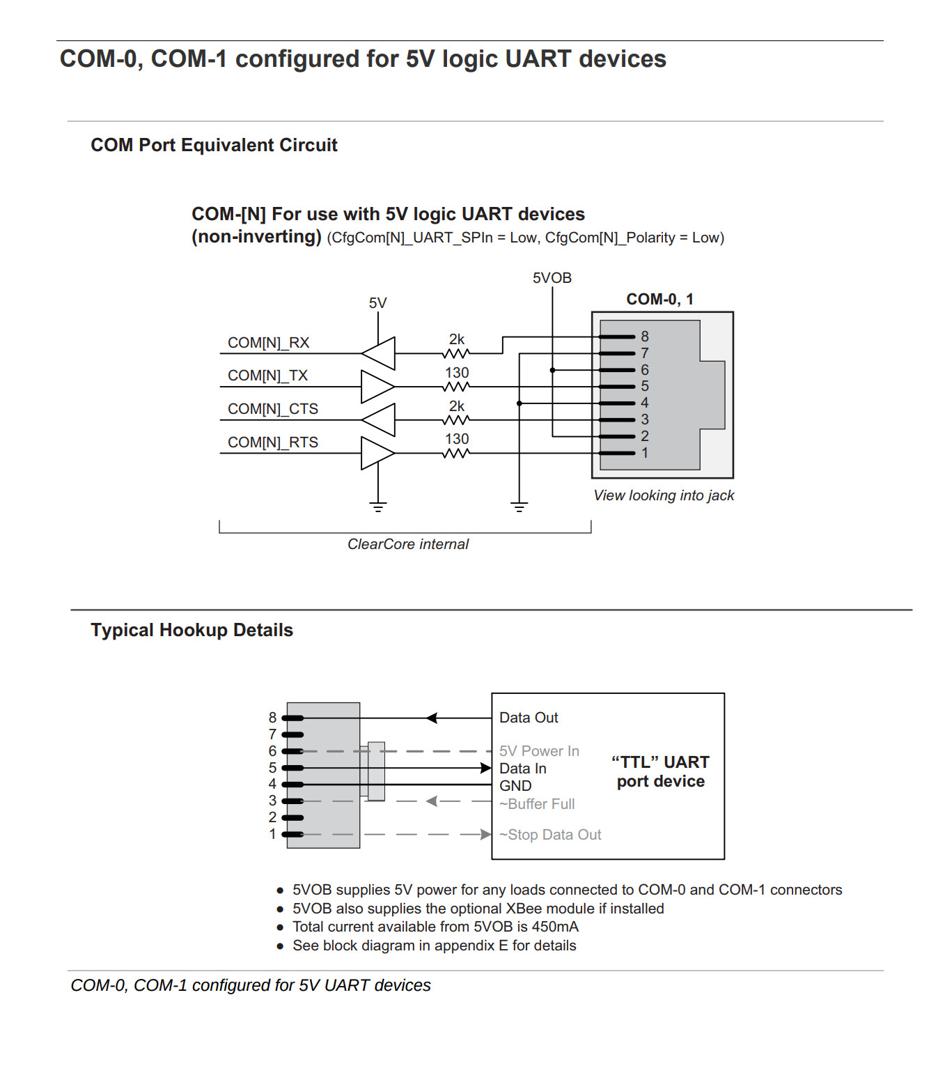
The ClearCore controller requires a cable terminating in an RJ45 connector. Check the pinouts in the user manual. Either of the two ports should work. See the example program for communicating over serial.
ClearCore device with comm cable connected
ClearCore pin-out for comm ports
Clearcore Client-Side Reference Code
For embedded devices, we have included an example that runs on the ClearCore I/O controller. Other devices should be similar.
Objective:
This example demonstrates how to send a request to the Burro and read the resulting response. It also utilizes the splitString and ParseResponse functions that can be found elsewhere.
Description:
This example will send a string over TTL to the Burro asking for the station status and wait for a response. It will then parse that response to see if the Burro has stopped for a station and flash a light if it does. It also has informative debug prints to be sent over the ClearCore's USB-B serial connection. Errors are printed but otherwise ignored and unhandled.
Requirements:
A TTL serial connection between COM-1 and the Burro robot.
A Burro robot with the Burro API
#define ARDUINOJSON_ENABLE_STD_STRING 1
#undef max
#undef min
#include <sstream>
#include <string>
#include <vector>
#include "ClearCore.h"

std::vector<std::string> splitString(std::string str, char delimiter = ',')
{
    std::vector<std::string> splitVect;
    std::stringstream ss(str);
    std::string substr;

    while (ss.good())
    {
        getline(ss, substr, delimiter);
        splitVect.emplace_back(std::move(substr));
    }
    return splitVect;
}

std::vector<std::string> ParseResponse(std::string response_string){
    // The response string is split around a single equals sign '='. There will never be more than one (1) equals
    // sign in a response string.
    std::vector<std::string> split_response = splitString(response_string.substr(1), '=');

    // The underscore '_' indicate the end of a response. It will be in the second slot of the vector along with the
    // timestamp and returned values. Strip any characters after it.
    int loc = split_response[1].find('_');
    split_response[1] = split_response[1].substr(0, loc);

    // Strip the leading percent '%' which is indicative of a response. Logic can be performed here to verify that
    // the message is a properly formatted response.
    std::string s = split_response[1];

    // Determine if there is an error in the response.
    if (s.find("#ERR") != std::string::npos)
    {
        std::string err_string = split_response[0] + " had error: " + s;
        split_response[1] = err_string;
        split_response[0] = "API Returned an error.";
        return split_response;
    }

    // Return the vector so it is known what response matches what original command.
    return split_response;
}

// Select the baud rate to match the target device.
#define baudRateSerialPort 115200
#define baudRateInputPort  115200
// Specify which serial interface to use as output.
#define SerialPort ConnectorUsb
// Specify which serial interface to use as input.
#define InputPort ConnectorCOM1
// Container for the byte to be read-in
int16_t input;
int main() {
    // Set up serial communication to print out the serial input.
    SerialPort.Mode(Connector::USB_CDC);
    SerialPort.Speed(baudRateSerialPort);
    SerialPort.PortOpen();

    // Setup communication over the COM port to communicate with Burro.
    InputPort.Mode(Connector::TTL);
    InputPort.Speed(baudRateInputPort);
    InputPort.Parity(SerialBase::PARITY_N);
    InputPort.StopBits(1);
    InputPort.FlowControl(false);
    InputPort.PortOpen();
    while (!InputPort) {
        continue;
    }

    while (true) {
        // Send the request for the information you want, in this case station status
        InputPort.Send("?STTN_\r");
        Delay_ms(100);

        // Create a string and read the first character
        std::string response = "";
        input = InputPort.CharGet();

        // While there are bytes to read, read them and add them to our response string
        while (input != -1) {
          response += (char)input;
          input = InputPort.CharGet();
        }

        // If there was a string read-in, parse it and perform logic.
        if (response != "") {
            // Display the string received. Mostly for debug purposes, if you don't have a print
            // capable monitor connected over USB-B comment this out.
            SerialPort.Send("Received:");
            SerialPort.SendLine((" " + response).c_str());
            // Parse the response to begin to perform logic. The command that was sent is in the 0th spot
            // in the vector.
            std::vector<std::string> parsed_response = ParseResponse(response);
            if ( parsed_response[0] == "?STTN") {
              // The parser has the API backend's response to the request in the 1st spot of the vector.
              // Split this on spaces to get the timestamp, and then any returned args. ?STTN should only
              // return one arg along side the timestamp. This will be 0 if no at a station and 1 if stopped
              // for a station.
              std::vector<std::string> split_station_response = splitString(parsed_response[1], ' ');
              if (split_station_response[1] == "1"){
                // Do whatever you want to do if you are stopped at a station. I am printing over USB-B and
                // flashing the built in LED on the ClearCore board.
                SerialPort.Send("Stopped for station at time");
                SerialPort.SendLine((" " + split_station_response[0]).c_str());
                ConnectorLed.State(true);
                Delay_ms(100);
                ConnectorLed.State(false);
                Delay_ms(100);
              }
            }
        }
        else {
            SerialPort.SendLine("No recieved");
        }
        // Wait a second then repeat...
        Delay_ms(1000);
    }
}